How to Structure Brand Guidelines for AI Tools: A Step-by-Step Framework
A practical framework for structuring brand guidelines that AI tools like ChatGPT and Claude can actually follow. Steps, formats, and examples included.
If you are searching for how to structure brand guidelines for AI tools, you already know the pattern: you paste a PDF into ChatGPT or Claude and you get content that sounds plausible but not on-brand. The problem is structure. AI tools consume structured rules, not narrative brand decks. This guide gives you a practical framework you can reuse for every brand you manage.
Here is the core distinction most teams miss. A traditional brand guideline is written to persuade a human designer or copywriter who already understands context. It leans on adjectives, mood boards, and tone described in feelings. A language model has none of that context. It needs instructions it can act on, constraints it can check against, and examples it can pattern-match to. When you hand a model a 40-page brand deck, it skims for keywords and fills the rest with its own defaults. That is where brand drift starts.
The fix is to translate your brand into machine-readable rules: voice as defined attributes with examples, audience as decision inputs, messaging as approved claims, and governance as explicit boundaries. The six steps below walk through exactly how to build that, what fields to create at each stage, and what "good" looks like.
Step 1: Audit What Your Current Guidelines Actually Say
Before you write anything new, identify what is explicit vs. implied in your current docs.
Create a quick audit worksheet with three columns:
- Explicit rules (you can point to exact sentences)
- Implied meaning (adjectives and vibes)
- Missing constraints (governance, do-not-do, escalation rules)
The point of this pass is not to rewrite everything. It is to separate what a model can act on today from what is trapped inside human intuition. Most brand decks are 80 percent implied meaning, which is exactly the part AI cannot use.
Example audit snippet (copy and adapt)
- Explicit: "Use calm, direct language."
- Implied: "Professional but approachable."
- Missing: "Do not claim guaranteed results. Escalate compliance topics."
If you want the deeper reasoning behind why this audit matters and what each field is actually doing for the model, the companion piece on why structured brand data outperforms a PDF covers it in detail.
Do / don't
- Do: extract 5 to 10 voice phrases your brand actually uses.
- Do: extract 5 to 10 "we never say" phrases.
- Don't: try to translate the entire PDF into structured data in one pass. Structure the high-leverage constraints first.
Step 2: Define Your Brand Voice in Structured Format
Use the 3-attribute method. For each voice attribute, write:
- Attribute name
- Definition (what it means operationally)
- Examples (sounds like and never like)
Include sentence structure rules and preferred vocabulary, because those are the fastest levers for consistent AI outputs. A model can copy a sentence pattern far more reliably than it can interpret an adjective like "bold."
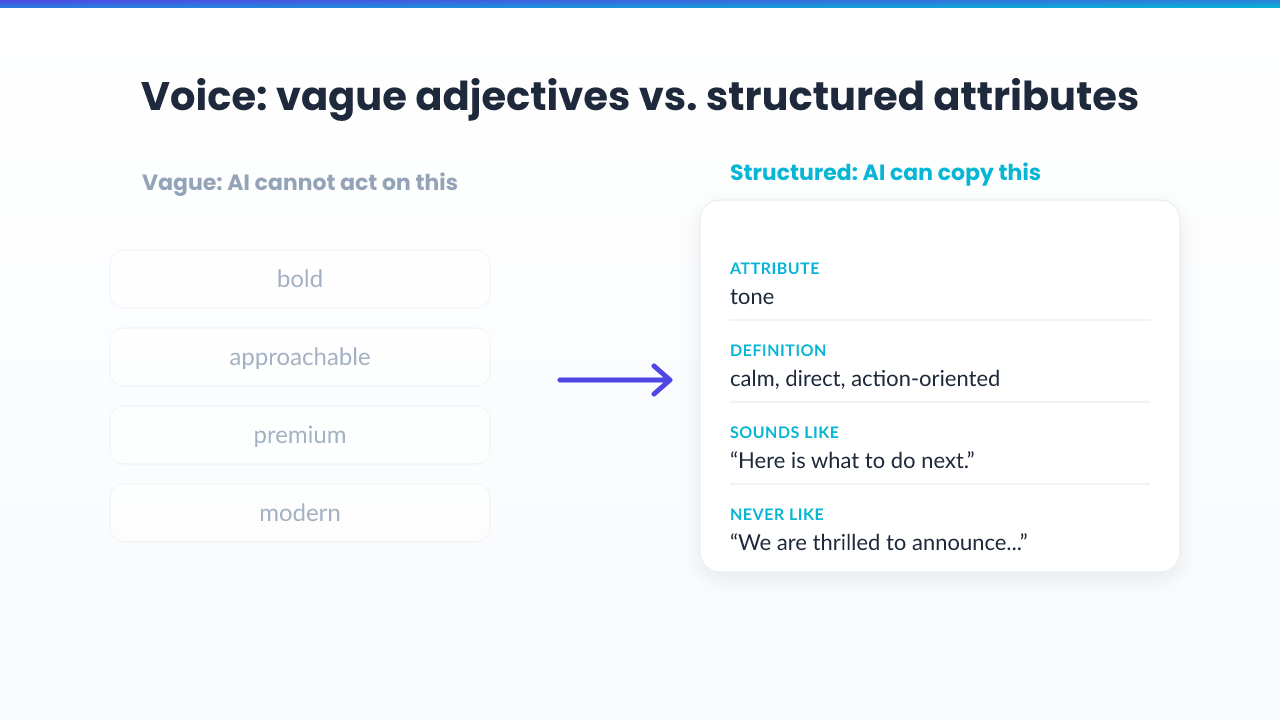
Example (use this template)
- Attribute: tone
- Definition: calm, direct, and action-oriented.
- Sounds like: "Here is what to do next. Keep it simple."
- Never like: "We are thrilled to announce..." or hype-driven language.
Do / don't
- Do: include 2 examples per attribute minimum.
- Do: define how the brand handles uncertainty (ask a question, or provide a safe general answer, then suggest next steps).
- Don't: write only adjectives. Models need instructions, not descriptors.
Step 3: Build Your Audience Data
Your audience section should help the model choose the right framing and language.
For each audience segment, capture:
- Who they are (role, company stage, context)
- What problem they came for
- What language they use (keywords, phrases, objections)
- What outcome they want
Keep each segment under 300 words so it is actually used. Long audience descriptions get truncated or ignored. The model needs decision inputs, not a persona novel.
Example audience segment snippet
- Segment: Fractional CMO (growth stage)
- Problem: needs on-brand AI output for multiple clients
- Language: "AI-ready," "governance," "brand drift," "exports," "workflows"
- Desired outcome: consistent voice and fewer review cycles
Do / don't
- Do: add a "what they fear" line. Governance constraints work better when tied to risk.
- Don't: merge multiple segments into one. If the audience changes, the voice and framing should change too.
Step 4: Structure Your Messaging Pillars
Messaging pillars are your brand's approved claims and proof.
Create 3 to 5 pillars. For each pillar, define:
- Primary claim (one sentence)
- Support points (3 to 6 bullets)
- Approved phrasing (1 to 2 phrases you want reused)
- Proof type (customer proof, internal proof, product proof)
Pillars are what stop a model from inventing claims you cannot stand behind. Without them, an AI tool will happily generate a confident sentence about results you have never measured.
Example pillar
- Pillar: AI-native brand operations
- Primary claim: Brand Kit OS turns voice, audience, and governance into structured data.
- Support: exports to ChatGPT and Claude, knowledge files, governance constraints, multi-brand workspace
- Approved phrasing: "structured AI-ready data," "governance as constraints," "export everywhere"
- Proof type: workflow screenshots and export outputs
Do / don't
- Do: map each pillar to a content type (email, landing page, support reply, blog draft).
- Don't: invent proof for pillars. If you do not have evidence, write "what we can say" instead of "what we cannot prove yet."
Step 5: Write Governance Rules (What the Model Must Not Do)
Governance rules are the difference between helpful content and avoidable risk.
Write governance in three layers:
- Off-limits topics (what not to address)
- Forbidden claims (what not to say)
- Risk workflow (what to do when the user request is outside constraints)
This is the layer most teams skip, and it is the one that protects you. A model with no governance will answer a regulated question with the same confidence it uses to write a tagline. Explicit boundaries are what keep it inside the lines.
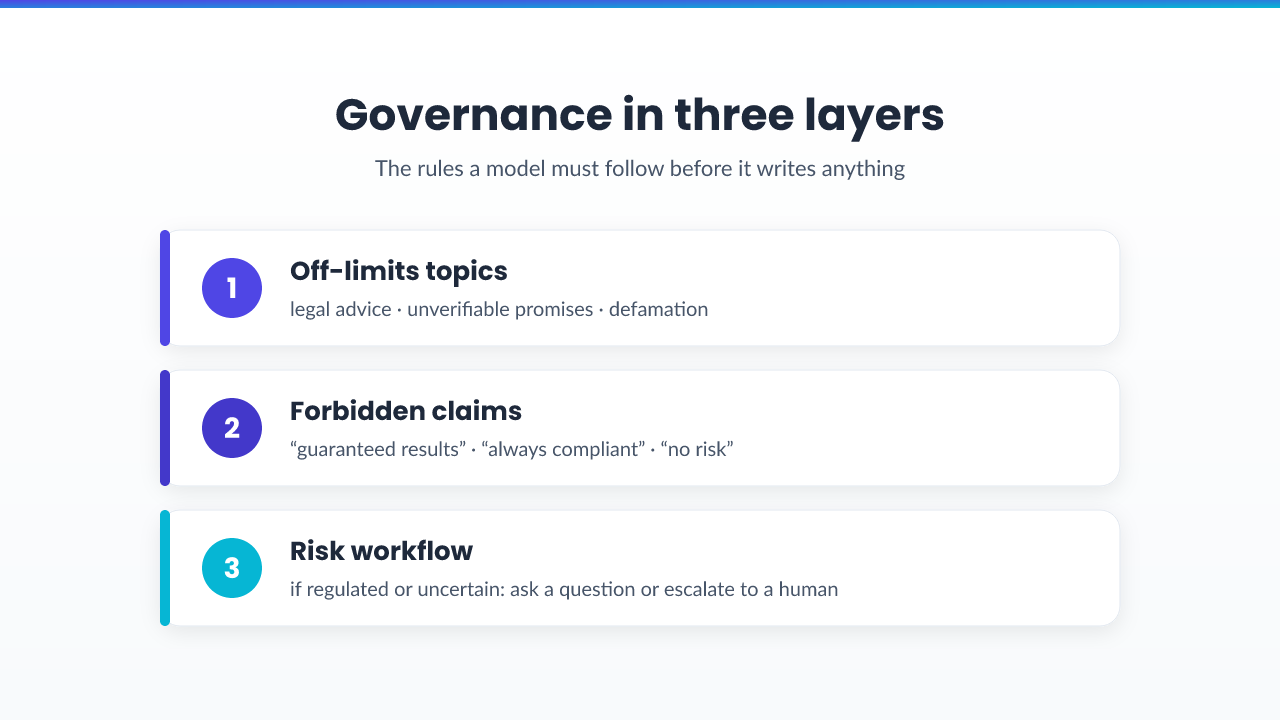
Example governance rule set
- Off-limits: legal advice, unverifiable promises, defamatory claims
- Forbidden claims: "guaranteed results," "always compliant," "no risk"
- Workflow: If the request is regulated or uncertain, ask a clarifying question or escalate to human review
Do / don't
- Do: keep governance rules short and explicit.
- Don't: bury constraints in a paragraph. AI follows the top-level rules it sees first.
Step 6: Choose the Right Export Format for Your AI Stack
This step is where many teams fail. They structure guidelines for humans and hope an exporter turns it into machine instructions. Instead, design your export mapping from day one. The format you ship in should match the tool that consumes it.

- Markdown exports
- Best for: Claude projects and any LLM that accepts a Markdown system block.
- How to format: one section per rule group (voice, audience, pillars, governance, knowledge).
- ChatGPT exports
- Best for: Custom Instructions and GPT builders.
- Use bullet structured rules and short examples so the model can retrieve quickly.
- Documentation: export to ChatGPT
- Claude exports
- Best for: project context style bundles and skill-like instructions.
- Use structured headings and repeated "hard boundary" sections near the top.
- Documentation: export to Claude
- MCP context
- Best for: always-on retrieval of brand facts by agents at run time.
If you want to see how this export mapping connects to an actual product workflow rather than a manual process, the Features overview shows where each field lands.
Downloadable template note
Use this blog post as your template checklist, then start with the free plan link:
- Start free ->
- Prefer a guided workflow? See AI Brand Kit.
Maintaining and Updating AI Brand Guidelines Over Time
Treat AI-ready guidelines like a living system. The single most common failure is not building the structure once. It is letting it go stale while your product, audience, and voice keep moving.
Update when:
- your product changes
- your primary audience changes
- your voice evolves
- you notice drift across outputs
Use a versioning mindset:
- change log your top-level rules
- re-export after updates
- run a lightweight QA check across multiple AI tools
If you want the "why" behind these fields, read Brand Guidelines for AI: How to Structure Your Brand So AI Tools Actually Follow It.
Do / don't
- Do: keep a small set of "golden examples" that you refresh when your brand evolves.
- Don't: update the human PDF and forget the machine exports.
Conclusion
This whole process, audit, voice, audience, pillars, governance, export, is exactly what we kept rebuilding by hand for every brand we managed. Doing it once in a doc is manageable. Doing it for a dozen client brands, then re-exporting every time a voice rule changed, is what made it clear the work belonged in a system rather than a folder of files. That is the gap Brand Kit OS was built to close.
Paste a URL, review the extracted fields across voice, audience, pillars, and governance, then export in the format your AI stack needs, whether that is ChatGPT, Claude, or MCP.
Start free ->